📝 Sharing, collaboration and offline devices
Sharing and collaboration
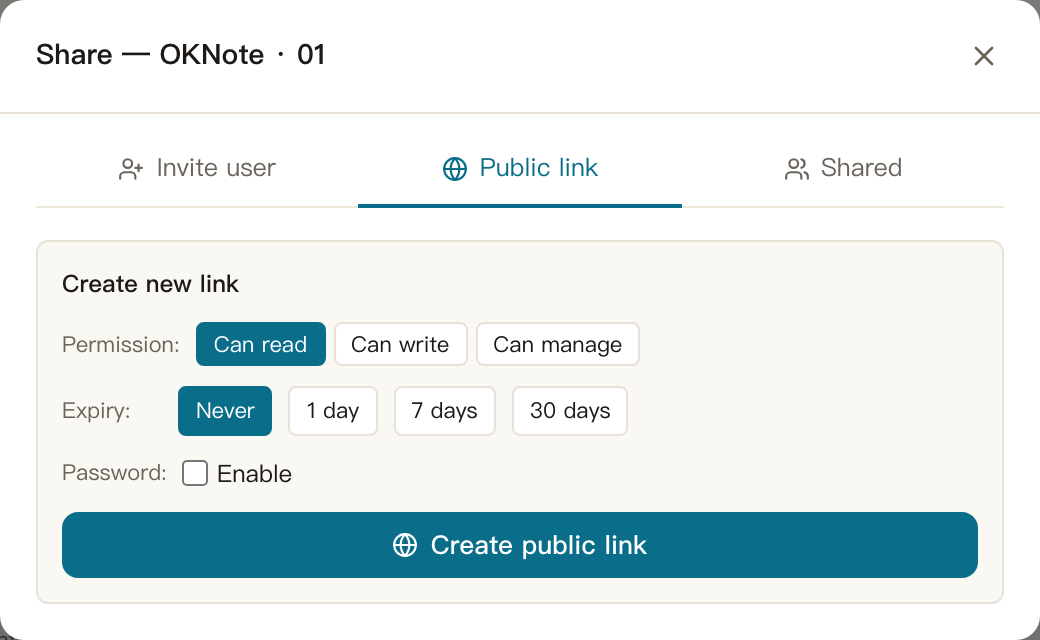
Open a note and click the share button in the top toolbar. Two options:
- Invite collaborators: add other members of your server to the note, with View / Edit / Manage permissions. When several people edit at once, you see each other's colored cursors — changes merge in real time without overwriting anyone.
- Public link: generate a web link anyone can open. You can set an access password and an expiry (1 day / 7 days / 30 days / forever), and revoke it at any time.
Notes that others share with you appear under Received shares in the sidebar.
Offline and multi-device

OKNote is built local-first: notes are written to a local cache first, so you can create and edit even with no connection, and changes sync to the server once you're back online. A small connection indicator sits at the top right of the editor — green means live sync; when you're offline it says so. Your content is safe either way.