
🪐 MindSparks: The Fragment Planet
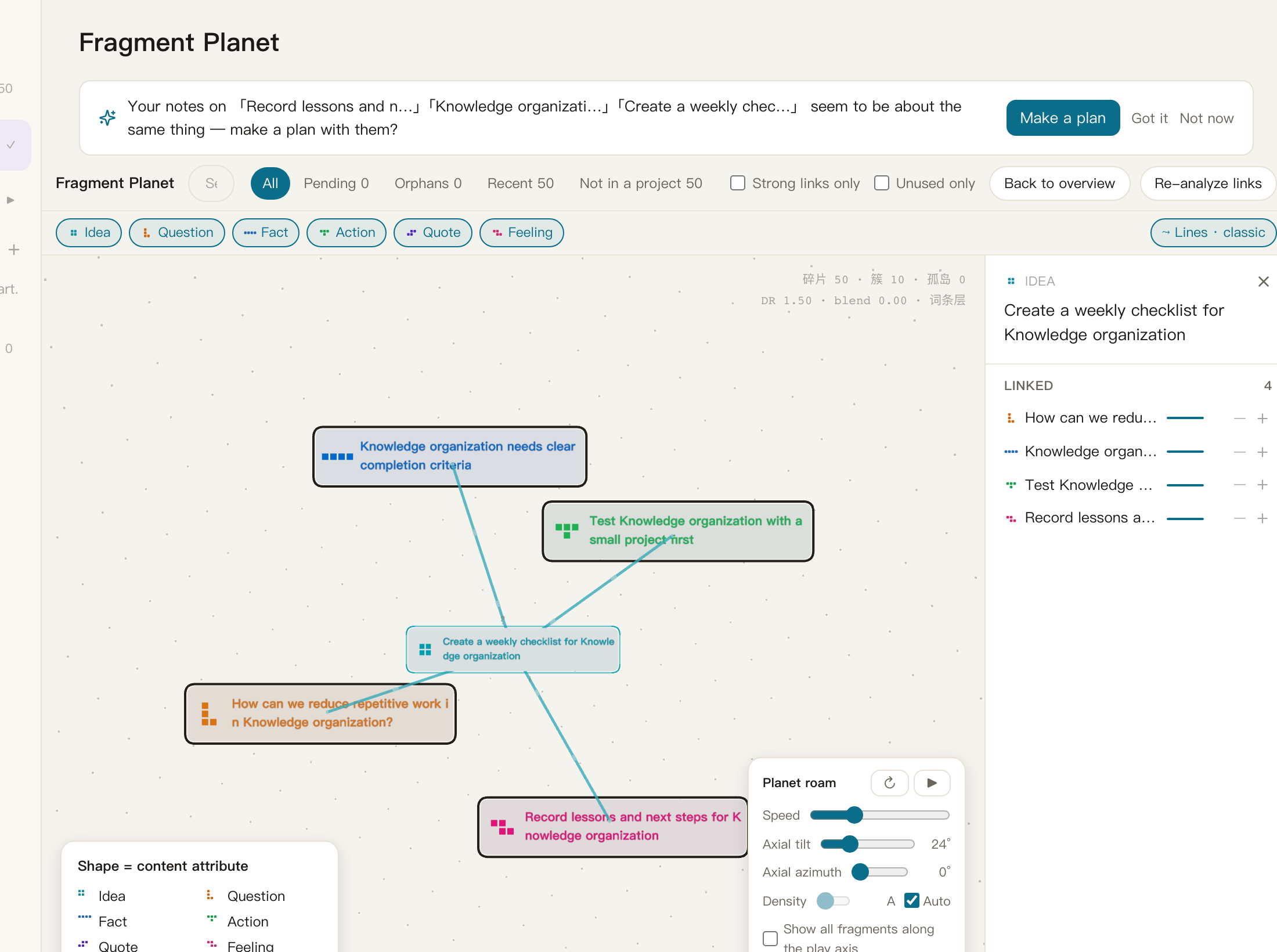
The Fragment Planet is a 3D semantic map of your fragments: the more you capture, the bigger the planet grows; fragments with similar meanings end up close together. AI does two things automatically — classifying shapes and building connections.
- Shape = content attribute: the attribute dimension AI classifies each fragment into; different regions of the planet correspond to different shape categories.
- Connection = AI relation: the semantic relation between fragments; the thicker the line, the stronger the relation.
Getting in and basic controls
Open it from the Fragment Planet item in the module's left navigation:
- Drag to rotate the view, scroll to zoom — the same hints appear at the bottom of the screen.
- When entries crowd together, drag any entry aside to keep it from blocking others.
- If WebGL isn't supported on your device, you'll see a notice that the graph view is temporarily unavailable.
Focus and close reading
Click any entry to make it the focus:
- Related fragments gather around it (the more relations, the wider they spread), their lines light up, and everything else recedes without disappearing.
- A card on the right lists relations in two groups: confirmed relations and pending ones.
- Click again or press Esc to snap back to the global view.
The Cluster tiles button in the top bar flattens the current cluster into cards for reading, each showing its count; click a card to gather around that entry.
Filtering and line styles
- Shape category multi-select filter (all selected by default).
- Bucket filter: all / pending / islands (fragments without any relation) / recent / not in project.
- A "strong relations only" toggle that keeps just the thick lines.
- Five line styles: classic / bold / thin dashed / dash-dot / off.
- The Planet tour playback panel: speed, axis tilt, axis azimuth, clockwise or counterclockwise, plus a mode that shows all fragments on the tour axis.
Where connections come from: analysis and confirmation
Connections on the planet come from two sources:
- Automatic AI analysis: computed from vector similarity. The entry point is Re-analyze relations in the Inbox or the graph; when it finishes you'll see a notice with how many suggested relations were added. It relies on the Embedding model in your AI settings; if not configured, the related panel guides you to Settings → AI, or to switch to a vector-capable provider.
- Your confirmation: AI-suggested relations appear as dashed-border cards in the Related fragments panel, each with a similarity percentage — you tap Confirm or Ignore; if neither feels right, Manually link connects two fragments directly. Confirmed relations use solid borders.
The empty state is honest: "No relations yet — try Re-analyze and let AI look for them."
Automatic analysis is budget-controlled: under Settings → MindSparks you can adjust the relation-analysis call budget (the most AI calls spent per round of automatic analysis) and the automatic-relation-reminders toggle (turned off, no automatic analysis and no reminders).
The topic basket: from planet to plan
The bar at the bottom of the planet is the topic basket — gather fragments into a batch and take them toward a plan:
- Press Space or tap the + beside an entry to add it to the basket; selected entries show as chips, and × removes one.
- The first selected entry automatically becomes the Central fragment, locking the gather-around view; removing it asks for confirmation.
- With a batch selected, there are three exits:
- Chat about these — talk the batch over with AI to converge on a direction;
- Or generate a doc directly — produce a Markdown document, optionally filed into a project (output will be filed into → project name);
- Make a plan with these — carry the selected entries into the Workshop, starting the flow from Plan exploration with multi-model comparison.
Capturing right on the planet
- The search box at the top reads "search entries, create if none…" — when nothing matches, press Enter as prompted to create the new entry.
- Double-clicking empty space also creates a new entry.